The day the water heater stops working is not the day you want to search for its model number, the installation date or the name of the plumber who serviced it last year. A home maintenance binder keeps all of that in one place: what your home has, what has been done to it, and what needs to happen next.
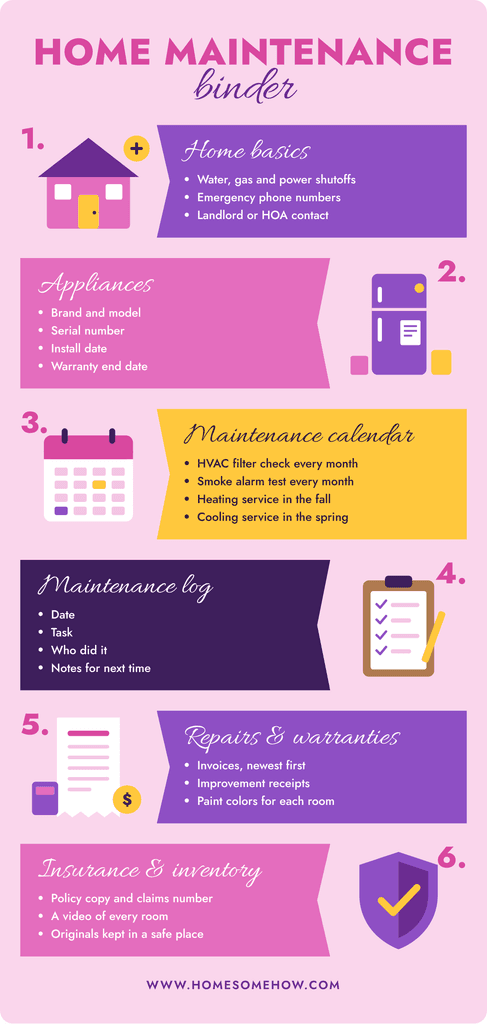
It does not need to be a big project. With six sections and about an hour, you can set up a binder that saves you time in every repair, insurance claim or move. This guide shows exactly what goes in each section, with examples you can copy.
Why a home maintenance binder is worth it
- Faster repairs. A technician can often diagnose the problem or order the right part from the model and serial number alone, before the visit.
- Warranties you actually use. Most people only discover an appliance was still under warranty after paying for the repair.
- Easier insurance claims. Receipts, photos and service records make it much easier to show what you had and how you cared for it.
- Emergencies. Ready.gov’s Emergency Financial First Aid Kit recommends keeping insurance policies and other important records in one secure location, so you can recover faster after a disaster.
- Selling or moving out. A record of repairs and improvements answers buyers’ questions and supports your asking price; for renters, it helps get the security deposit back.
What you need
- A 1- or 1.5-inch ring binder.
- Six tab dividers.
- A few sheet protectors and one pocket folder for receipts.
- Your phone, to photograph labels and documents.
- A folder on your computer or cloud storage with the same six sections.
Using the same section names on paper and on your computer turns them into one system: whatever you cannot find in one, you will find in the same place in the other.
The 6 sections of a home maintenance binder
1. Home basics and emergency contacts
The first page anyone should see: where the water, gas and electricity shutoffs are, and a short list of phone numbers (plumber, electrician, HVAC company, utilities, landlord or HOA, insurance). If you have not located your shutoffs yet, our guide on how to find and label your home’s emergency shutoffs shows how. A babysitter or house sitter should be able to handle an emergency with this page alone.
2. Appliances and home systems
One line per appliance or system: the furnace or heat pump, air conditioner, water heater, fridge, dishwasher, washer, dryer, oven and anything else with a label. Walk around the house with your phone and photograph each label; it is usually inside the door, on the back or on the side. Then fill in a table like this one:
| Item | Brand and model | Serial number | Installed | Warranty until | Filter or part |
|---|---|---|---|---|---|
| Water heater | Brand, model | From the label | Month and year | Date | Anode rod type |
| Furnace | Brand, model | From the label | Month and year | Date | Filter size, e.g. 16x25x1 |
| Fridge | Brand, model | From the label | Month and year | Date | Water filter model |
Keep the manuals in the digital folder rather than in the binder: most are available as PDFs on the manufacturer’s website, and they take up a lot of space on paper.
3. Maintenance calendar
A one-page list of what needs doing and when. Start with the tasks that have clear official guidance:
| Task | How often | Source |
|---|---|---|
| Check the HVAC air filter | Every month | ENERGY STAR |
| Professional check of the cooling system | Every spring | ENERGY STAR |
| Professional check of the heating system | Every fall | ENERGY STAR |
| Test smoke alarms | Every month | U.S. Fire Administration |
| Replace smoke alarms | Every 10 years | U.S. Fire Administration |
Then add what your manuals recommend, like cleaning the dishwasher filter or flushing the water heater. Our guide on how often to change your HVAC filter explains how to adjust that task to your home.
4. Maintenance log
A simple sheet where you write down what you did and when. One line is enough:
| Date | Task | Who | Notes |
|---|---|---|---|
| Jan 5 | Changed furnace filter | Me | 16x25x1, MERV 8. Next check Feb 5 |
| Mar 12 | Tested smoke alarms | Me | Hallway alarm needed a new battery |
| Apr 20 | AC tune-up | HVAC company | Refrigerant OK. Invoice in section 5 |
The log is what turns the binder into a history of your home. After a year, you will know how fast your filters get dirty, which appliance gives trouble and which tasks you keep postponing.
5. Repairs, improvements and warranties
Every invoice for a repair or improvement goes here, newest first: what was done, by whom, what it cost and whether the work has its own warranty. Keep improvement receipts (a new roof, a remodeled bathroom, new windows) for as long as you own the home; they matter when you sell and when you file an insurance claim. Add the paint brand, color name and finish for each room on one page, so touch-ups are easy.
6. Insurance and home inventory
A copy of your homeowners or renters insurance policy with the policy number and the claims phone number on top. Keep the originals of deeds and other legal documents in a fireproof box or a safe place, not in the binder. Then add a home inventory: a video walking through each room, opening closets and drawers, is the fastest way to record what you own. Save it in the digital folder, ideally in cloud storage, so it survives if something happens to the house.
How to set it up in one hour
- 10 minutes: label the six tabs and create the six digital folders with the same names.
- 20 minutes: walk through the house and photograph every appliance label, the shutoffs and the electrical panel.
- 15 minutes: fill in the appliance table and the emergency contacts page.
- 10 minutes: gather the receipts and warranties you already have and drop them into section 5.
- 5 minutes: print the maintenance calendar and write the next date for each task.
Don’t wait until the binder is complete. The first accurate appliance record is already useful. If you have just moved in, add it to your first 30 days in a new home checklist.
A lighter version for renters
If you rent, the landlord is responsible for most systems, so your binder can be thinner. Keep the lease, the move-in photos and inspection report, the landlord’s or property manager’s contact details, your renters insurance, and a log of every repair request with the date you sent it and the date it was fixed. That log protects you if there is a disagreement about damage or the deposit when you move out.
Keep it current in 10 minutes a month
- When you buy an appliance, put the receipt in the binder the same day and add a line to the table.
- When a technician comes, write the visit in the log before you put the invoice away.
- Once a month, when you check the HVAC filter and test the smoke alarms, write both in the log.
- Once a year, remove expired warranties and update the emergency contacts.
Store the binder somewhere everyone in the house can find it, next to your basic tool kit is a good choice, and tell the rest of the household where it is.
Frequently asked questions
Is a digital home maintenance binder better than a paper one?
The best option is both. Paper is quick to check and works without power or internet; digital is searchable, holds manuals and photos, and survives if the paper is lost. Use the same section names in both.
What should not go in the binder?
Original legal documents, like deeds or passports, and anything with full bank or card numbers. Keep those in a fireproof box or a safe place, and keep only a note in the binder saying where they are.
How long should I keep repair receipts?
Keep receipts for improvements for as long as you own the home, and repair invoices at least until their warranty ends. When in doubt, scan them: a digital copy takes no space.